
I recently discovered a few Claude Code features I didn’t know about.1
Mobile access and remote control. Claude Code has a mobile interface through the iPhone app. You can move sessions between devices using claude --teleport or /teleport, which pulls a cloud session down to your local machine with full conversation history intact. The /remote-control command goes the other direction, letting you control a locally running session from your phone or browser. Your code stays on your machine; only chat messages pass through the encrypted channel. (Remote control docs).
Scheduled loops. The /loop and /schedule commands let Claude run automatically at set intervals for up to a week. The idea is to turn recurring workflows into skills, then put them on a timer. (Scheduled tasks docs).
Git worktrees and batching. Claude Code has deep support for git worktrees, which matters when you want multiple agents working in parallel on the same repository (CLI reference). I clipped a video from Anthropic’s Claude Code course that demonstrates this in a previous blog post.

Session management. You can fork a session with /branch or from the CLI with claude --resume <session-id> --fork-session.
By the way. The /btw command lets you ask side questions while the agent works without polluting the main conversation history.
Custom agents. Define a new agent in .claude/agents with a custom system prompt and restricted tool set, then run it with claude --agent=<name>. You could create a read-only agent that can only use the Read tool, useful for code review without risk of unintended edits. (Sub-agents docs).
The Chrome extension. For frontend work, this gives Claude a way to verify its own output visually. If you ask someone to build a website but they can’t open a browser, the result probably won’t look good. The Chrome extension closes that feedback loop so Claude can iterate until things actually look right. (Chrome extension docs).
Other useful flags. The --bare flag speeds up SDK startup by up to 10x by skipping the default search for local CLAUDE.md files, settings, and MCPs. The --add-dir flag gives Claude access to additional repositories beyond the one you started in. And /voice enables voice input (hold the spacebar to speak in the terminal), although I’m perfectly happy using VoiceInk for this. (Desktop app docs).
Hooks. These let you run deterministic logic at specific points in Claude Code’s lifecycle, independent of what the model decides to do. They fire on events like PreToolUse, PostToolUse, SessionStart, Stop, and others. A few concrete examples: a PreToolUse hook matching on Bash can block dangerous shell commands like rm -rf or curl | sh before they execute. A PostToolUse hook matching on Edit|Write can automatically run Prettier on every file Claude modifies. A SessionStart hook can inject project context (git status, recent issues, environment variables) at the beginning of every session. A Stop hook can send you a desktop notification or auto-commit changes when Claude finishes a task. Hooks are configured in your settings JSON and run with your user permissions. (Hooks docs).
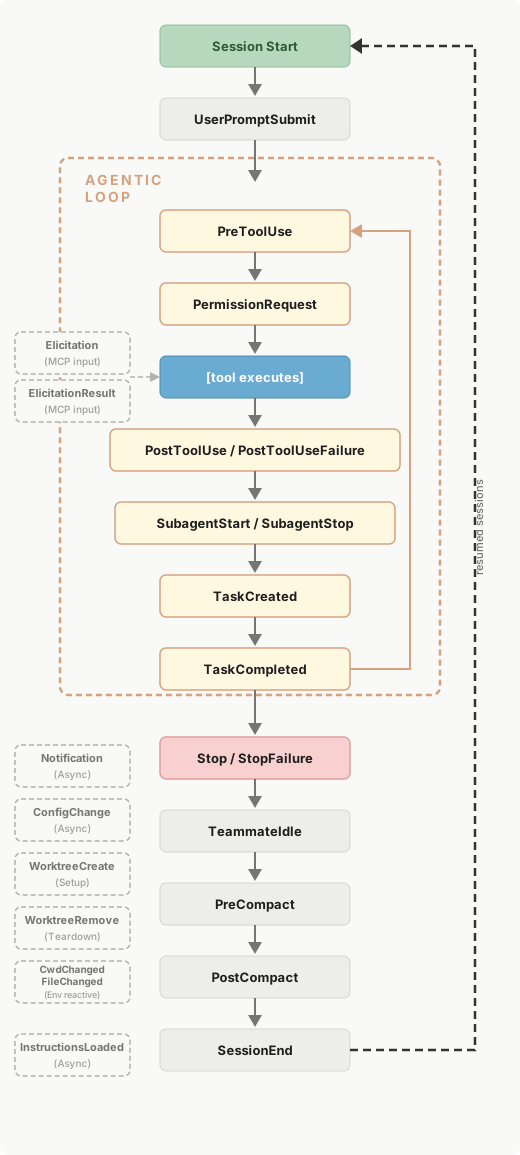
Some of these are just from reading the documentation, others by seeing what Boris Cherny is talking about.
Wow - learned a couple new features! Two more knobs that I tweak:
1) turning auto compaction off. I find the quality of the model output drops after compaction. More importantly, the context window limits push me to scope down tasks to be smaller and more constrained. Finally, this actually frees up some of the context window that is reserved for compaction, so each individual task can run a bit longer.
2) manually picking the effort level. I believe this adjusts the reasoning budget. Some tasks (like speccing out a large feature, writing an e2e test) really benefit from the reasoning budget, whereas others (simple refactors, running linters/unit tests) do not. Sometimes I’ll set Claude-code to a low effort level and use codex for the high effort tasks, or vice versa depending on where in the model release cycle we are.