
You’ve been here. A webinar you really want to watch that conflicts with a class you have to teach. A Zoom meeting/event where the host is recording and transcribing, and you know from experience the recording never actually gets sent around. Back-to-back meetings, and you need to step away for 10 minutes to recaffeinate.
Granola solves this problem (and a bunch of other problems I don’t have) for a monthly subscription fee. I built Trailmix to help with this for free, with everything staying private on my machine, no third party or monthly fee involved.1
Trailmix is a MacOS menu bar app that records system audio, your microphone, and optionally a window or a whole display, then transcribes it all on-device to give you a text file transcript, and mixes both audio channels into a video mp4 you can watch later. Nothing is uploaded anywhere, there’s no account and no API key, no monthly fee, no cloud, no AI (yet). There’s no app window either, just click the Trailmix icon, pick your sources, and start recording.2
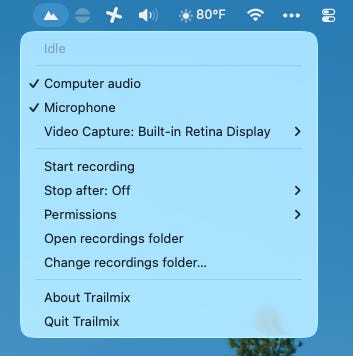
Features
It keeps two audio tracks separate. mic.caf is your microphone, system.caf is everything the Mac played. Each gets transcribed on its own and merged by timestamp, so transcript lines are tagged Mic or System without any speaker-identification / diarization model involved. You get a combined mixed.m4a audio recording, plus a mixed.mp4 with the video and audio if you captured a screen.
The Stop after feature is for the webinar case. Arm a recording, walk away, and it closes itself out at the time you picked (a preset, or e.g. type 1h10m). If the meeting runs long there’s a menu item to Add 15 minutes. Recordings stop after 8 hours regardless, so one you forgot about can’t fill the disk overnight.
Transcription is done on device with Parakeet TDT 0.6B v2 through FluidAudio’s Core ML port, around 20 seconds per hour of audio on Apple Silicon. The 440 MB of weights download once. There’s also an on_stop hook that runs a shell command on the session folder when the transcript is done (for example, you could wire this up to move files around or hand the transcript to an AI for a summary).
Roadmap
On the near-term roadmap: summaries generated locally too, next to the transcript, with key points, decisions, and action items. I’m not going to re-read 8,000 words from an hour long meeting, and shipping off all those words to a frontier model API undoes the reason I’m doing everything local on my own machine in the first place. Next thing I’m bringing to this is the ability to (optionally) generate AI summaries locally with llama.cpp using a small open-weight model running on your machine.
Other miscellaneous features I’d like to implement: noticing and warning about a silent audio track while it’s still recording; adding a search feature to read through transcript.json files across the recordings folder; add a recent sessions selector in the menu; optional notifications to offer to record when a different app requests the microphone; decoupling the computer audio capture from the video target; configurable microphone selection and preflight checks; and transcription model selection beyond Parakeet to enable non-English transcriptions.
Distribution
Right now if you want to try it out you’ll have to build it from source. It’s just a git clone followed by a make install, and the README that walks through all of it.
Getting it into the App Store, or even just creating the .app inside a .dmg you can install yourself without MacOS Gatekeeper’s scary unidentified developer warnings — these require an Apple developer account at $99/year.3 So, a question: would you pay $10 for Trailmix? One time, for life, no subscription. If I can find a few people who would, I’ll pay Apple’s fees and do the signing and review work, and it becomes something you can install and forget about. Let me know in the comments or just email me.
https://github.com/stephenturner/trailmix
When I say “I built Trailmix” I mean that I conjured Trailmix into existence with heavy reliance on Claude Opus 5 high in Claude Code for development and testing, with GPT-5.6 Sol high in Codex for adversarial review and analysis, followed by more rounds with Opus in Claude Code to consider and implement fixes identified by GPT-5.6.
Record only where single-party consent is legal. It varies by state and by country, so check. Or much better, just ask: “I’m recording this for my own notes, any objections?” Everyone these days is recording Zoom calls with Zoom AI companion, or sending their Otter or Firefly AI spies into meetings to do the same. Which is fine, but at least I know when something’s being recorded. Trailmix provides no indicator in your Zoom meeting or Webex client or whatever that you’re recording your screen and audio. So, do so responsibly and courteously.
Yes, I’m aware I can partially solve the distribution challenge with Homebrew, but requiring someone fire up a terminal to type brew install isn’t much of an improvement over the current requirement to fire up a terminal and type make install.
Nifty! I'm increasingly enjoying the opportunities that Whisper + LLMs open up, inspired by https://interconnected.org/home/2025/03/20/diane
The Apple developer fee is frustrating,* and I wonder how it might change as personal software continues to become more accessible. $99/yr isn't a devastating fee, but I'm a grad student and I feel every penny leaving my wallet - and if you want to be cross-platform, you gotta pay Microsoft, too!
*Not half as frustrating as macOS's hissy fit when you try to run an unsigned app. Just open the goddamn pod bay doors!
I'm used to `git pull`ing and running python apps from terminal, but as I'm vibing out my [dream tool](https://github.com/lukehearon/seenote) for coordinating my lab's data annotation, I'm realizing that typing words into a terminal is just too daunting for most users, even academic researchers who are supposedly "digital natives."