
After I abandoned the no-AI-for-a-month thing, I’m making up for lost time here. Only thing is now that I’m doing some fairly long-horizon multiagent work in Claude Code and Cowork, I’m frequently blowing through my session limit with just one or two prompts. I’ve written about this session limit anxiety before.

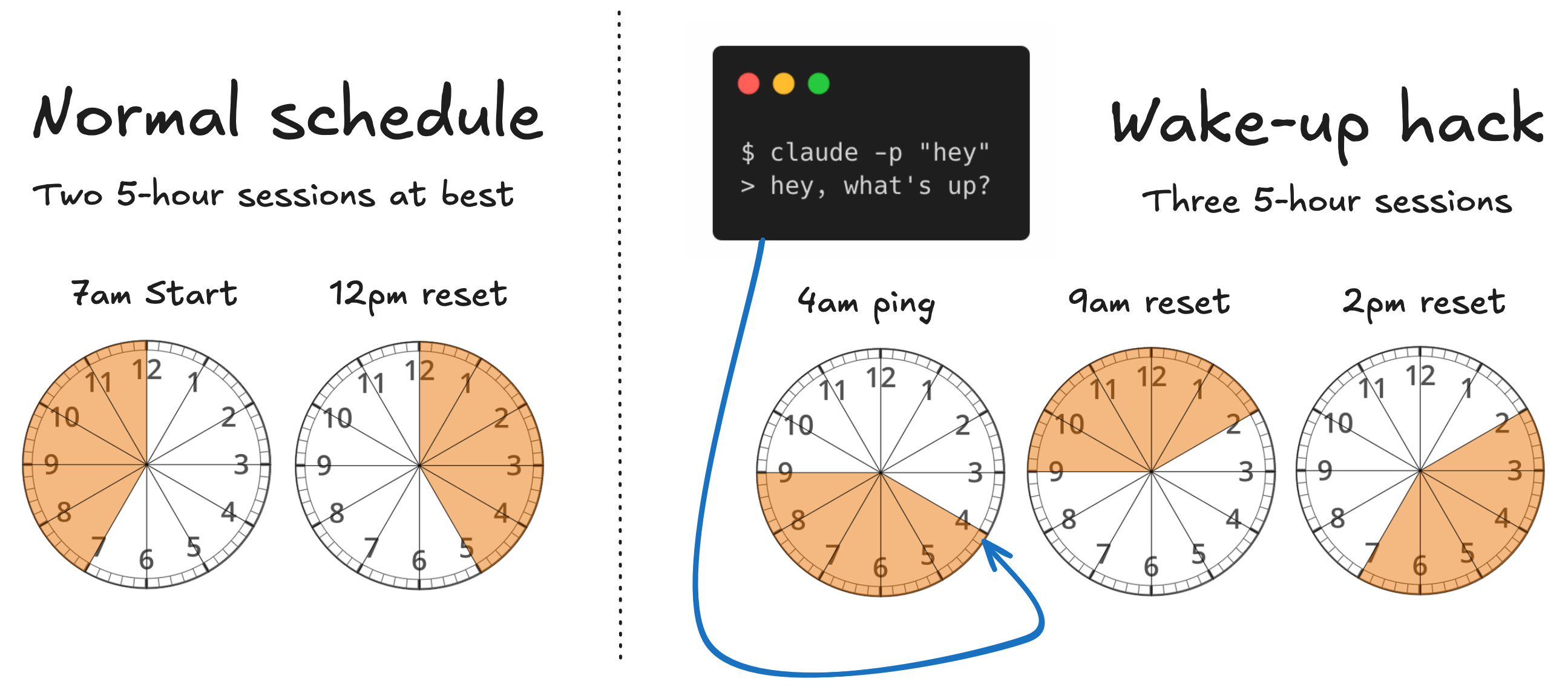
I’m an early morning person. My typical morning will start with a run or ride or sauna at 5am, and some work (personal projects and day-job work) at around ~6-7 before the camp/school shuffle, and the bike into work. If I do some work with Claude at around 7:00am, my five-hour session limit starts and I typically hit my session limit quickly, which locks me into extra usage at API rates until 12:00pm. Assuming I start another session around noon, that’ll extend until 5pm, when I’m normally wrapping things up and heading home. I.e., I’ll get two five-hour sessions at most over the course of a normal workday.
I’m short-circuiting that with a little hack. I set my Mac to wake up every morning at 3:58am, and at 4:00am it’ll run claude -p "hey". That -p flag just tells Claude to print the output of running the prompt, which in this case is “hey”. It barely uses any tokens, with Claude responding with something like “hey what’s up?”.
But the point is, now my session starts at 4am (instead of 7am), and resets at 9am (instead of 12pm), right about the time I’m settling into the office and getting back to work. Assuming I kick off another session-consuming prompt at 9am, that opens the door to a third session that starts at 2pm. The whole point is now I can get three full 5 hour sessions in a single workday instead of two if I kick off a session very early, effectively shortening my first “session” to 2 hours instead of 5.1
How to do it (on a Mac)
I haven’t used a Windows computer since Windows 98, so if you’re not on Mac, ask Claude how to do this on Windows (Linux is easy with cron). On MacOS I’m using a Launch Agent.
First, set your mac to automatically wake up at 3:58am. Or whenever. Move this forward or backward depending on your daily routine. Point is to have this kick off a prompt a few hours before you really get to work.
# Set an automatic wake every day at 3:58am
sudo pmset repeat wake MTWRFSU 03:58:00
# Test - make sure it works
pmset -g sched
Then add a launch agent (like a cron job).
vim ~Library/LaunchAgents/us.stephenturner.claudeping.plistCopy the text below into this file. Replace /Users/sdt5z/.local/bin/claude on line 11 with whatever is returned when you run which claude. You’ll need to use a full path for this to work.
<?xml version="1.0" encoding="UTF-8"?>
<!DOCTYPE plist PUBLIC "-//Apple//DTD PLIST 1.0//EN" "http://www.apple.com/DTDs/PropertyList-1.0.dtd">
<plist version="1.0">
<dict>
    <key>Label</key>
    <string>us.stephenturner.claudeping</string>
    <key>ProgramArguments</key>
    <array>
        <string>/bin/bash</string>
        <string>-lc</string>
        <string>/Users/sdt5z/.local/bin/claude -p "hey"</string>
    </array>
    <key>StartCalendarInterval</key>
    <dict>
        <key>Hour</key><integer>4</integer>
        <key>Minute</key><integer>0</integer>
    </dict>
    <key>StandardOutPath</key>
    <string>/tmp/claudeping.log</string>
    <key>StandardErrorPath</key>
    <string>/tmp/claudeping.err</string>
</dict>
</plist>
Test, make sure it works (replace paths/filenames with whatever you called them).
# Tear down the service if it already exists
launchctl bootout gui/$(id -u)/us.stephenturner.claudeping 2>/dev/null
# Build it again
launchctl bootstrap gui/$(id -u) ~/Library/LaunchAgents/us.stephenturner.claudeping.plist
# Force the service to start
launchctl kickstart -k gui/$(id -u)/us.stephenturner.claudeping
# You're looking for an exit code 0
launchctl print gui/$(id -u)/us.stephenturner.claudeping | grep -iE 'last exit|runs'
# See the logs
cat /tmp/claudeping.log /tmp/claudeping.err
That’s it. Enjoy that extra session while subscription-based subsidized usage lasts!
Yes, I fully realize that I sound like a tokenmaxxing workaholic writing it out this way. I’m not using Claude Code 15 hours per day. In reality while using Opus or Fable you’re going to hit a session limit on a $20 plan very quickly. This essentially gives me 3 windows to use Claude at subscription rates instead of 2 windows. Soon enough I’m sure everything’s going to be metered at API rates, but for now I’m just trying to take advantage of those VC token subsidies while I can.
I run it in VSCode.. get it to write a plan for a large coding sprint, review the plan.. then tell it to start (in manual mode).. and then use /remote-control ... Then I can go shopping and accept the changes on the phone app while I get on with some daily chores..
Or create a cloud routine with Haiku that instructs Claude to do nothing. Not tied to hardware so you don't have to have a computer on!